

Standalone Newsletter Guidelines
To help you design a successful newsletter, we’ve compiled a few tips along with the technical specifications for content submission. Experience has shown that ads whose design closely follows the style of our editorial newsletter tend to have higher click-through rates.
All character limits include spaces.
Basics
1. Newsletter Subject Line
The subject line determines whether the recipient opens the newsletter. Keep it concise.
Max. 40 characters
2. Pre-header
Complements the subject line with additional keywords and also influences the open rate.
Max. 60 characters
3. Top Image
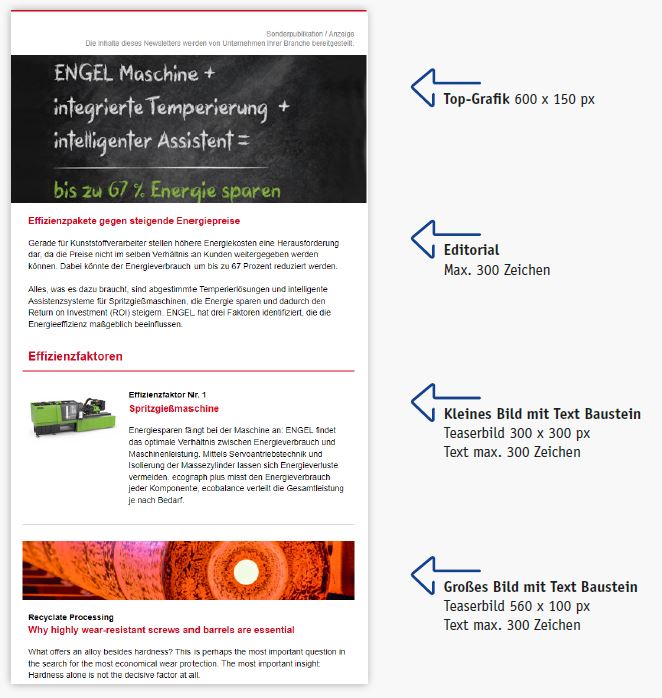
A top graphic integrated into the template is optional. Please provide an image measuring 600 x 150 pixels at 150 dpi.
Tip: A top graphic is a great way to capture the reader’s interest. Experience shows that highly promotional images, photos of people alone, or company logos are less well-received by readers.
4. Editorial
The editorial is optional and may include a personalized greeting.
Max. 300 characters
Tip: Readers skim editorials, so they should pique their curiosity about the content that follows.
5. Newsletter Modules
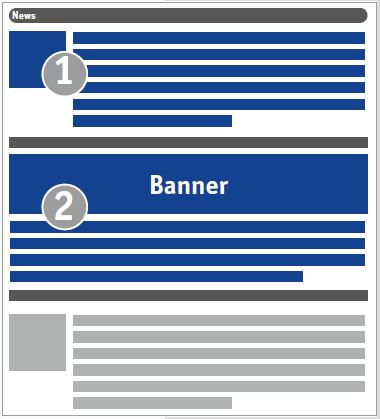
Your newsletter is divided into different sections, known as modules. You can mix and match up to nine modules as you like. A module consists of a headline, a teaser text, an image, and a text link. All of these elements link to the same destination URL.
5.1 Block Types
a. Small Image with Text
A square teaser image (150 x 150 pixels) can be placed to the right or left of the text for each module. The text should not exceed 300 characters.
b. Large Image with Text
A large, full-width image (560 x 100 pixels) is placed above the text. The text should not exceed 300 characters.
5.2 Module Heading
Max. 60 characters
5.3 Module Teaser Text
Max. 300 characters
5.4 Links
The text link should not exceed 40 characters. The target URL also applies to the module’s heading and image.
5.5 Images
- Square: 150 x 150 pixels at 72 dpi
- Landscape: 560 x 100 px at 72 dpi
Retina-ready: If you want your image to appear in high quality on Retina displays, triple the image size. Please note, however, that the image will still be delivered in the formats listed above, so no additional space will be created for the display.
Accessibility: Legal requirements mandate an image caption. Please include one with your submission.
File format: Please submit images in JPG or PNG format.
Link: The image links to the target URL just like the link text.
5.6 PDF Download
We host up to 3 PDFs for you, each with a maximum size of 5 MB, which you can link to directly from the newsletter.
6. Social Media
Are you active on Facebook, LinkedIn, Twitter, Xing, or YouTube?
Please provide us with the URL of your social media channel, and we’ll include the corresponding links.
File Formats
Images: Please submit your images in jpg, png, or gif format and indicate the order as well as any accompanying text (captions, copyright information, etc.).
Texts: Please submit your texts as Word documents
Note: Each order includes one round of revisions. Any additional work beyond this may be billed separately.
Submitting Your Data
Please submit the collected content by email no later than the deadline specified in the order confirmation or data request to: